How to refresh the Umbraco V14+ Bellissima content tree with code

Hello all,
It’s been a while since I have shared a quick tip working with Umbraco Bellissima aka the modern WebComponent built Umbraco backoffice that has been available since Umbraco V14+.

I have been working for a client where their requirements was to import and sync nodes from another instance and a nice little UX was when the nodes have finished importing that the tree and its child nodes (if expanded), would automatically refresh and show the new nodes.

What does this do?

Rather than me try to explain this, sometimes with a quick gif/video I can show you what we are trying to achieve.
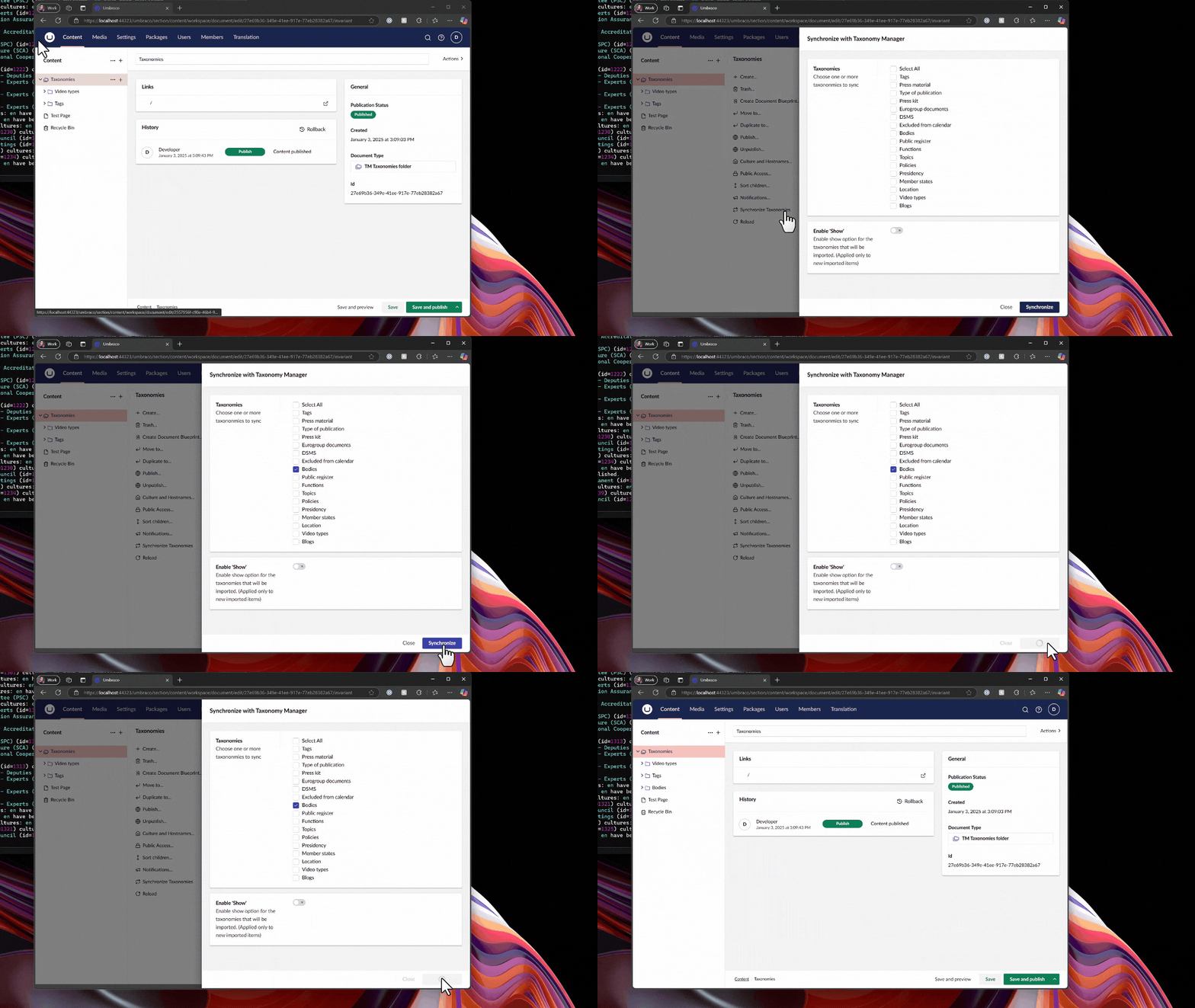
An animated gif showing a custom modal updating and refreshing the content tree to see new content nodes immediately

Just show me the code snippet

// Imports
import { UMB_ACTION_EVENT_CONTEXT, UmbActionEventContext } from "@umbraco-cms/backoffice/action";
import { UmbRequestReloadChildrenOfEntityEvent } from "@umbraco-cms/backoffice/entity-action";
import { UMB_DOCUMENT_ENTITY_TYPE } from "@umbraco-cms/backoffice/document";

// Properties of class
#eventContext: UmbActionEventContext | undefined;

// Constructor
constructor() {
    // Consume the contexts & assign
    this.consumeContext(UMB_ACTION_EVENT_CONTEXT, (eventContext) => {
        this.#eventContext = eventContext;
    });
}

// Example click method assigned to an uui-button
#clickSyncNodes(ev: Event) {
    // Call some API to do some work and import content nodes
    // ...

    // Use the notification context to show a success message
    // ...

    // Sends out an event to reload the children of the tree
    // If the tree is expanded then you will see the new nodes appear
    this.#eventContext?.dispatchEvent(new UmbRequestReloadChildrenOfEntityEvent(
        {
            // This is the unique GUID/key of the current node in the tree to refresh
            // Use a GUID passed into a modal instead of hardcoded value as in this demo code
            unique: "f57456d6-9f8b-4943-8b85-01a44e023dde",
            
            // Type of entities to reload, could be things like media, members or own custom entity types
            entityType: UMB_DOCUMENT_ENTITY_TYPE
        }
    ));
};

I hope you found the snippet of some use, if you use this in your codebase. Drop me a message in the comments. I would love to hear about your use case and why you needed to use the UmbRequestReloadChildrenOfEntityEvent

Until next time…
Happy Hacking 👋

How to Overwrite the Save & Publish button and more in Umbraco V14

With Umbraco V14+ and the new updated WebComponent based extensible backoffice, we have the power and flexibility to override and swap out existing functionality with our own.

For this example I will show how we can update the Save and Publish button on a content node with own implementation. For this we will replace the button so that when the user clicks the save and publish button that it will play a sound display some confetti 🎊

Here is what we are building

Just show me the code

Manifest

import { UMB_ENTITY_IS_NOT_TRASHED_CONDITION_ALIAS } from '@umbraco-cms/backoffice/recycle-bin';
import type { ManifestWorkspaceActions } from '@umbraco-cms/backoffice/extension-registry';

export const manifests: Array<ManifestWorkspaceActions> = [
	{
		type: 'workspaceAction',
        kind: 'default',
        overwrites: 'Umb.WorkspaceAction.Document.SaveAndPublish', // Alias of thing you want to overwrite
        alias: 'Tada.WorkspaceAction.Document.SaveAndPublish',
        name: '[Tada] SaManifestve And Publish Document Workspace Action',
        api: () => import('./tada.save-and-publish.action.js'), // Our implementation
        weight: 70,
        meta: {
            look: 'primary',
            color: 'positive',
            label: 'Awesome Save & Publish' // Update the text of the button
        },
        conditions: [
            {
                alias: 'Umb.Condition.WorkspaceAlias',
                match: 'Umb.Workspace.Document',  // Only show for Document workspace
            },
            {
                alias: UMB_ENTITY_IS_NOT_TRASHED_CONDITION_ALIAS, // Ensure the item is not in trash
            },
        ]
	},	
];

Workspace Action

import { UMB_DOCUMENT_WORKSPACE_CONTEXT } from '@umbraco-cms/backoffice/document';
import { UmbWorkspaceActionBase } from '@umbraco-cms/backoffice/workspace';
import { launchConfetti } from '../Confetti';

export default class TadaDocumentSaveAndPublishWorkspaceAction extends UmbWorkspaceActionBase {

    async execute() {
        try {
             // Get the workspace context
            const workspaceContext = await this.getContext(UMB_DOCUMENT_WORKSPACE_CONTEXT);

            // Load in drumroll
            const audio = new Audio('https://hackmakedo.com/audio/drumroll.mp3');

            // Define a flag to ensure the specific code runs only once
            let codeExecuted = false;

            audio.addEventListener('timeupdate', async () => {
                console.log('Current time:', audio.currentTime);

                // Check if the current time is at least 5 seconds and the specific code hasn't run yet
                if (audio.currentTime >= 1.5 && !codeExecuted) {
                     // Save and publish the document
		            await workspaceContext.saveAndPublish();

                    // Confetti time
                    launchConfetti();
    
                    // Ensure the code doesn't run again
                    // As the timeupdate event is fired lots as sfx  plays
                    codeExecuted = true;
                }
            });

            // Play the drumroll
            audio.play();
        }
        catch (error) {
            console.error('Failed to save and publish document', error);
        }
    }
}

So the key thing to learn here is that by specifying the alias of the extension you want to overwrite as a the overwrites property in the new extension manifest.

A quick note

Currently there is a small bug/issue with replacing the Save & Publish button as this then removes the child popver menu items such as Unpublish, Schedule Publish etc…

The issue has been reported on GitHub and has been acknowledged as a reproducible bug by Umbraco HQ.

Want to take a further look

Well if you want to take a look at the source code, you can view the GitHub repository or if you prefer you can install it in your Umbraco site 🎉

Go have fun, experiment and see what you can replace